How Jig builds an app
Describe it, approve the plan, watch it run. Jig drives your AI coding assistant on your own computer and saves every step, so nothing is ever lost.
Five stops between your idea and a live link
Real screens from real builds. No terminal, no setup decisions, nothing to undo by hand.
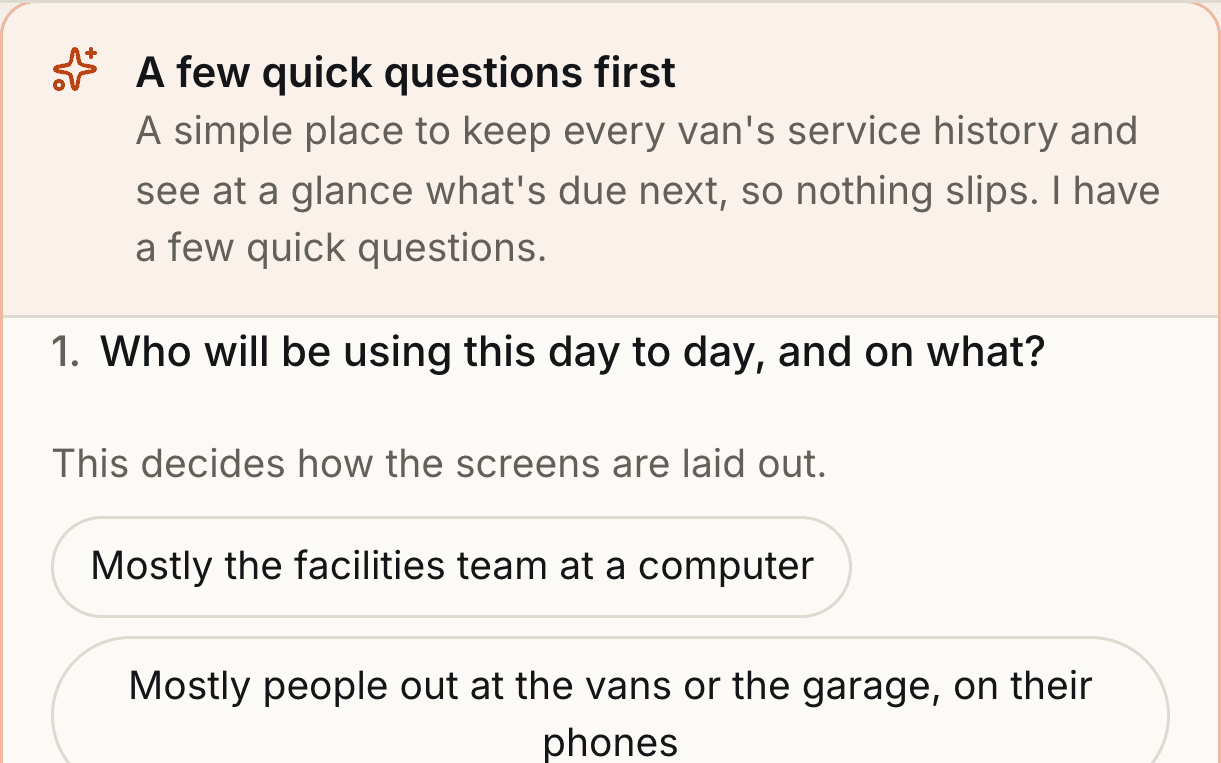
It asks before it builds
A few questions written for your idea, and a look-and-feel picker with eight designed themes. Your answers become a written brief, the app’s theme and a hand-picked set of vetted skills. Then the first build starts.
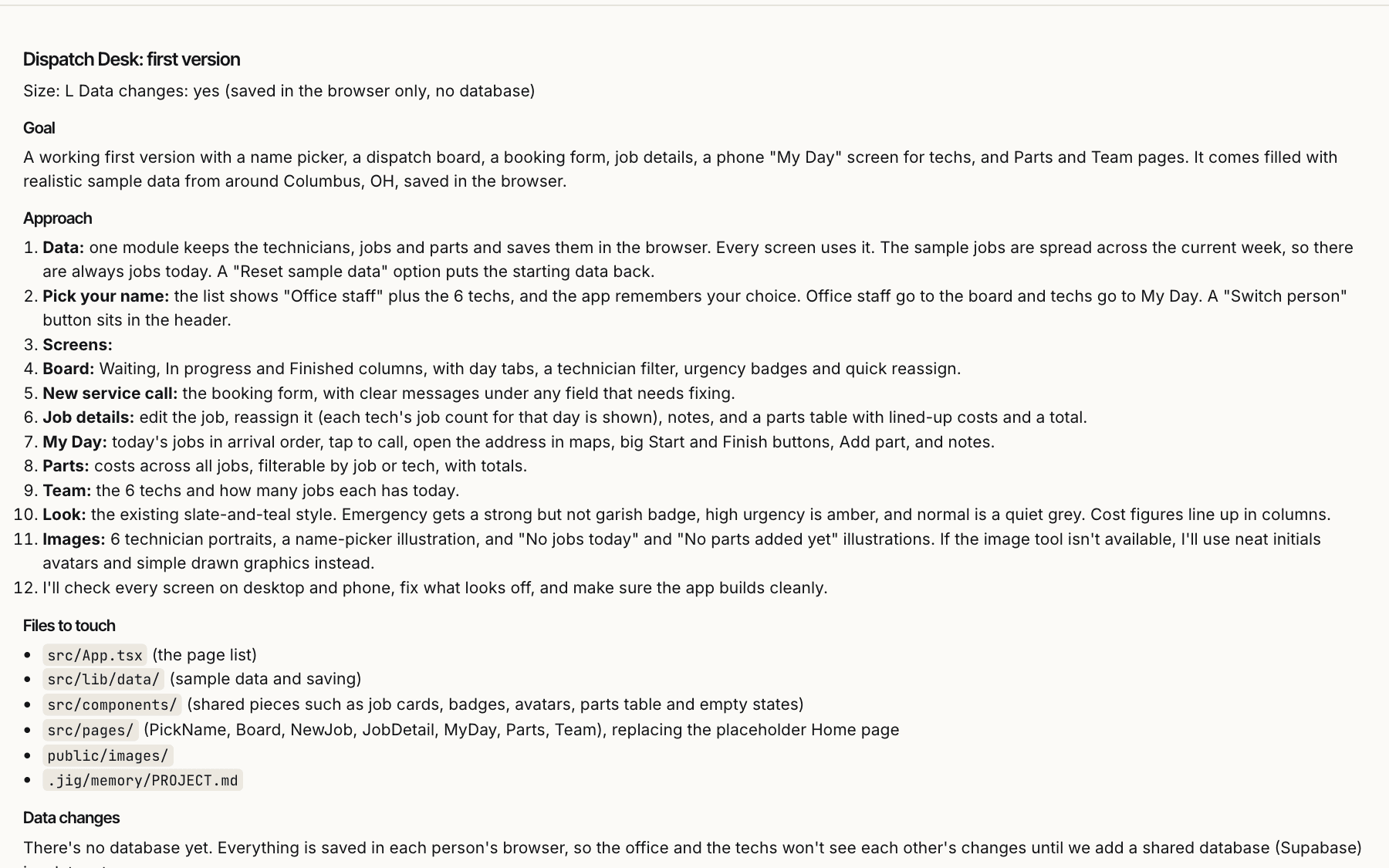
You read the plan first
Bigger changes arrive as a plan in plain English: the goal, the approach, the files it will touch, the risks. Approve it, edit it or throw it away. Small edits just happen.
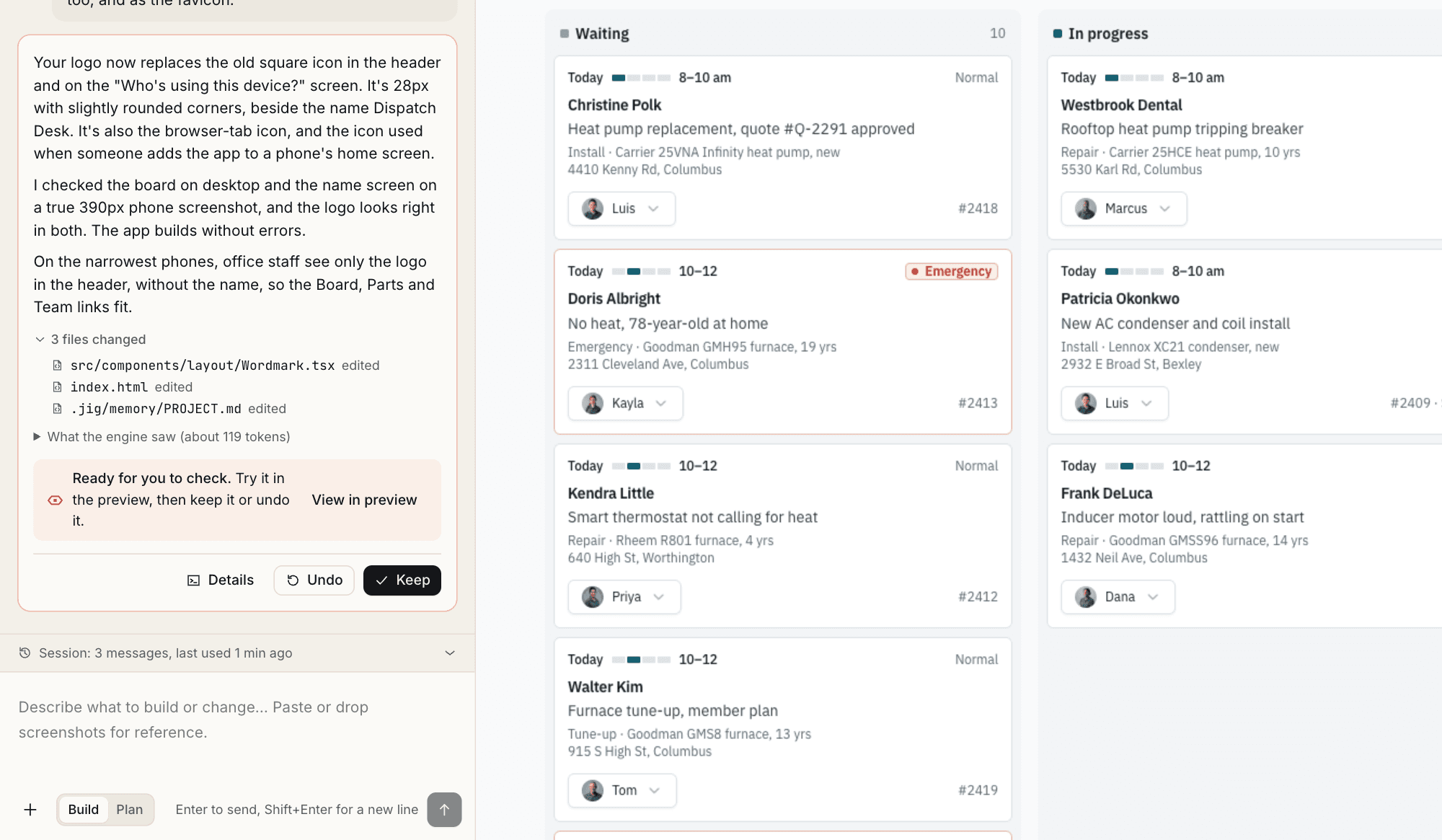
Every step is a checkpoint
Your AI coding assistant writes the code while Jig reports progress in plain language. Each change is saved in git, so you can keep it, undo it, or go back to any earlier point.
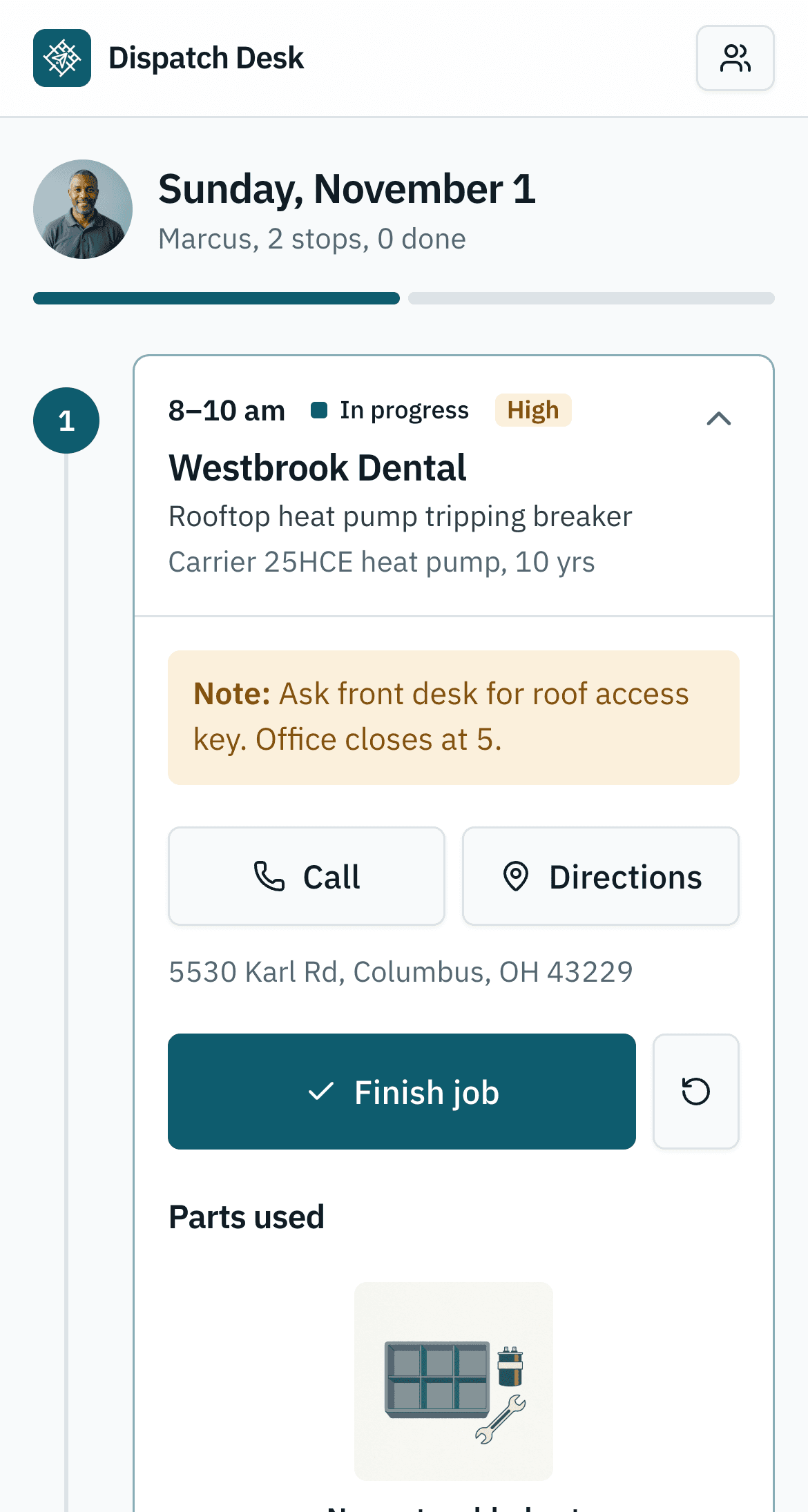
Try it at every size
The running app sits beside the chat, with desktop, tablet and phone sizes. When something breaks, the error turns into a banner with Ask Jig to fix.
Ship it somewhere you own
Publish to your own Netlify account, download a zip of the built site, or take a Dockerfile to your own servers.
- NetlifyOn your account, with your token in the keychain
- ZipThe built site, ready for any static host
- DockerfileFor your own servers and pipelines
What stays on your computer
Hosted builders keep your code on their servers and sell the AI back to you as credits. Jig keeps both with you.
- Your files
- Every project is a plain folder and git repository under ~/Jig. Open it in VS Code, push it to your git server, or bring in projects you already have. There is nothing to export if you ever leave.
- Your AI
- Jig drives the AI coding assistant you already use, Claude Code or OpenAI Codex, or your company’s own AI account. That provider bills your usage. Jig never charges for AI.
- Your keys
- When the AI needs a key, it asks through a secure box in the chat. Keys are stored in your operating system’s keychain, and the AI only ever sees their names.
The AI assistants you can use
Build apps with Claude Code, with ChatGPT through OpenAI Codex, or with other models through opencode. Claude Code has the deepest integration today.
The assistant you already use
Jig drives a coding assistant on your computer, on your own plan.
- Claude Code
- OpenAI Codex
- opencode, for OpenRouter, Google, Groq or local models through Ollama
Or your company’s AI
Connect through your enterprise account or API key. That provider bills you directly.
- Claude through Amazon Bedrock, Google Vertex AI or Microsoft Foundry
- An Anthropic or OpenAI enterprise API key
IT decides what’s allowed
A managed policy chooses which assistants and providers people can pick.
- Enforced on every computer, not just hidden in Settings
- Keys stay in the operating system’s keychain
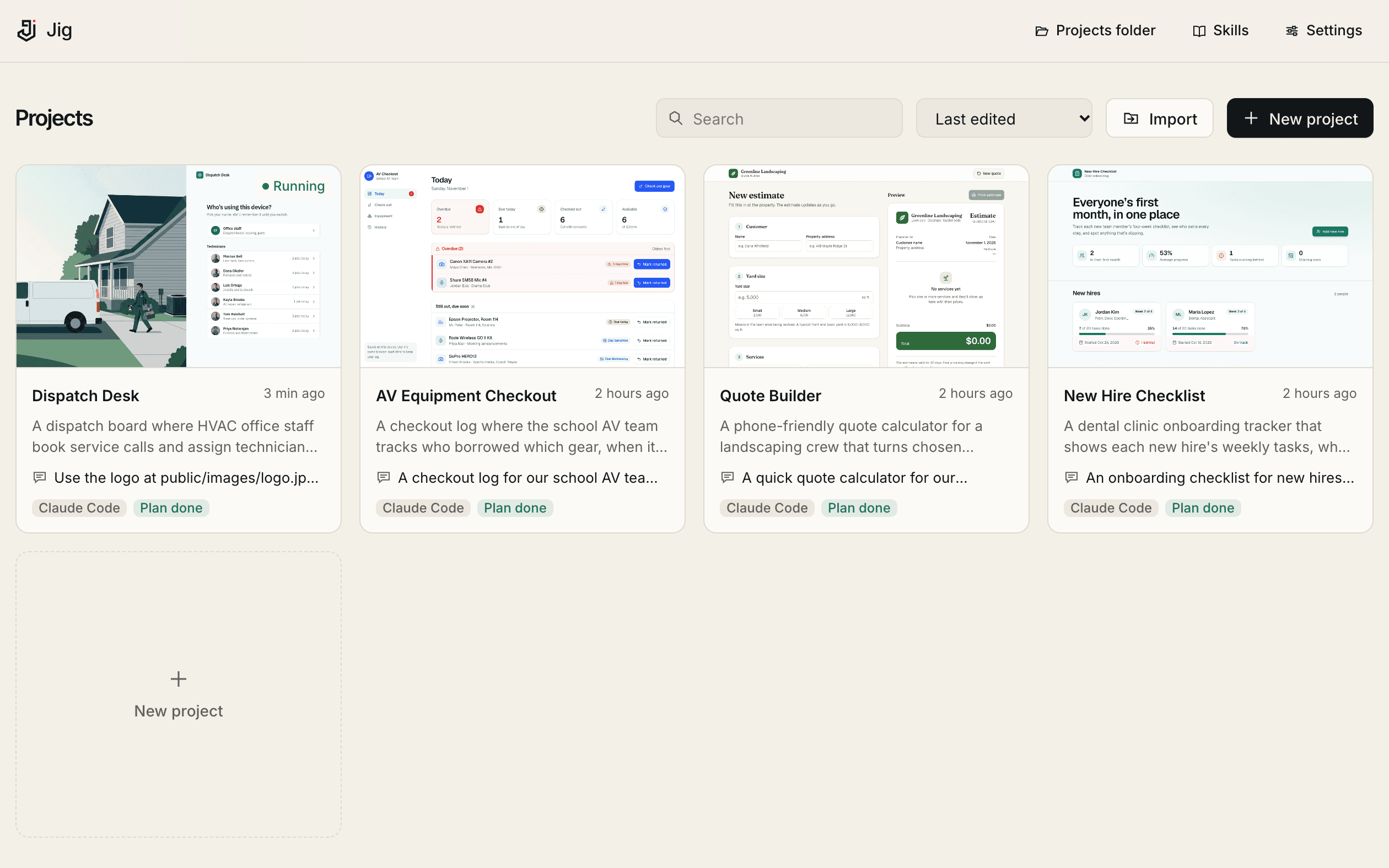
Every project, one click away
Each app is a card with its last request and a live preview. Rename or move a folder and Jig finds it again.
- Brings in what you have
- Point it at your Desktop and Documents. It gathers existing projects and writes a summary of each.
- Project memory
- Jig keeps a running summary, the decisions made and what is left to do, so the AI picks up where you left off.
- Real images
- Connect an image provider and Jig generates the logo, photos and illustrations your app needs while it builds.
Questions we get
Do I need to know how to code?
No. You describe what you need and answer a few questions. Developers can open the same project folder in VS Code or a terminal whenever they like.
Which AI does it use, and who pays for it?
The AI coding assistant you already have: Claude Code or OpenAI Codex, or opencode for other models such as OpenRouter, Google, Groq or local models through Ollama. Companies can connect their own AI instead: Claude through Amazon Bedrock, Google Vertex AI or Microsoft Foundry, or an Anthropic or OpenAI enterprise API key. Claude Code has the deepest integration today. Your AI provider bills you for usage directly. Jig never charges for AI.
Does Jig see my code, prompts or keys?
No. Your projects stay on your computer, prompts go straight from your machine to the AI provider you chose, and keys stay in your keychain. Jig Cloud only knows who you are and which version of Jig you run.
What does it run on?
macOS 12 or later on Apple Silicon or Intel, Windows 10 or 11 (64-bit), and x64 Linux desktops. The desktop app can also open Jig in your browser. You also need an AI coding assistant such as Claude Code or OpenAI Codex, or an enterprise API key through Bedrock, Vertex AI or Foundry. See downloads for every platform.
Can my team work on the same app?
Yes. Projects push to your company’s git, so a teammate can open the same app in Jig, pick up where you left off and review every checkpoint. Company templates and a shared library of skills and components are on the roadmap. See the roadmap for IT.
Your next app starts in a folder you own.
Free to download. Bring the AI you already have.
Free for macOS, Windows and Linux.