Every app you build, in one place

Jig is an AI app builder that runs on your own computer. Each project keeps its code, history, plans, previews and publishing together, and the Claude or ChatGPT plan you already pay for does the building.

Free for macOS, Windows and Linux.

~/Jig/dispatch-desk/
  • src/your app’s code
  • public/images/images generated while it built
  • .jig/memory/the summary, decisions and to-do list
  • .git/a checkpoint for every change
  • jig.jsonthe project’s id, so it is never lost
  • .env.localnever shown to the AI, never committed
A Jig project is an ordinary folder and git repository. Your keys are not in it at all: they live in your operating system’s keychain.

Use the AI subscription you already pay for

Hosted builders sell the AI back to you as credits. Jig drives the assistant on your own plan, so there is never a second AI bill.

Claude
Build apps with Claude Code on your Claude plan or an Anthropic API key. Claude Code has the deepest integration today.
ChatGPT
Build apps with OpenAI Codex, signed in with your ChatGPT plan or an OpenAI API key.
Everything else
opencode connects OpenRouter, Google, Groq, or local models through Ollama.

Your AI provider bills your usage directly. Jig never charges for AI, and the local builder is free.

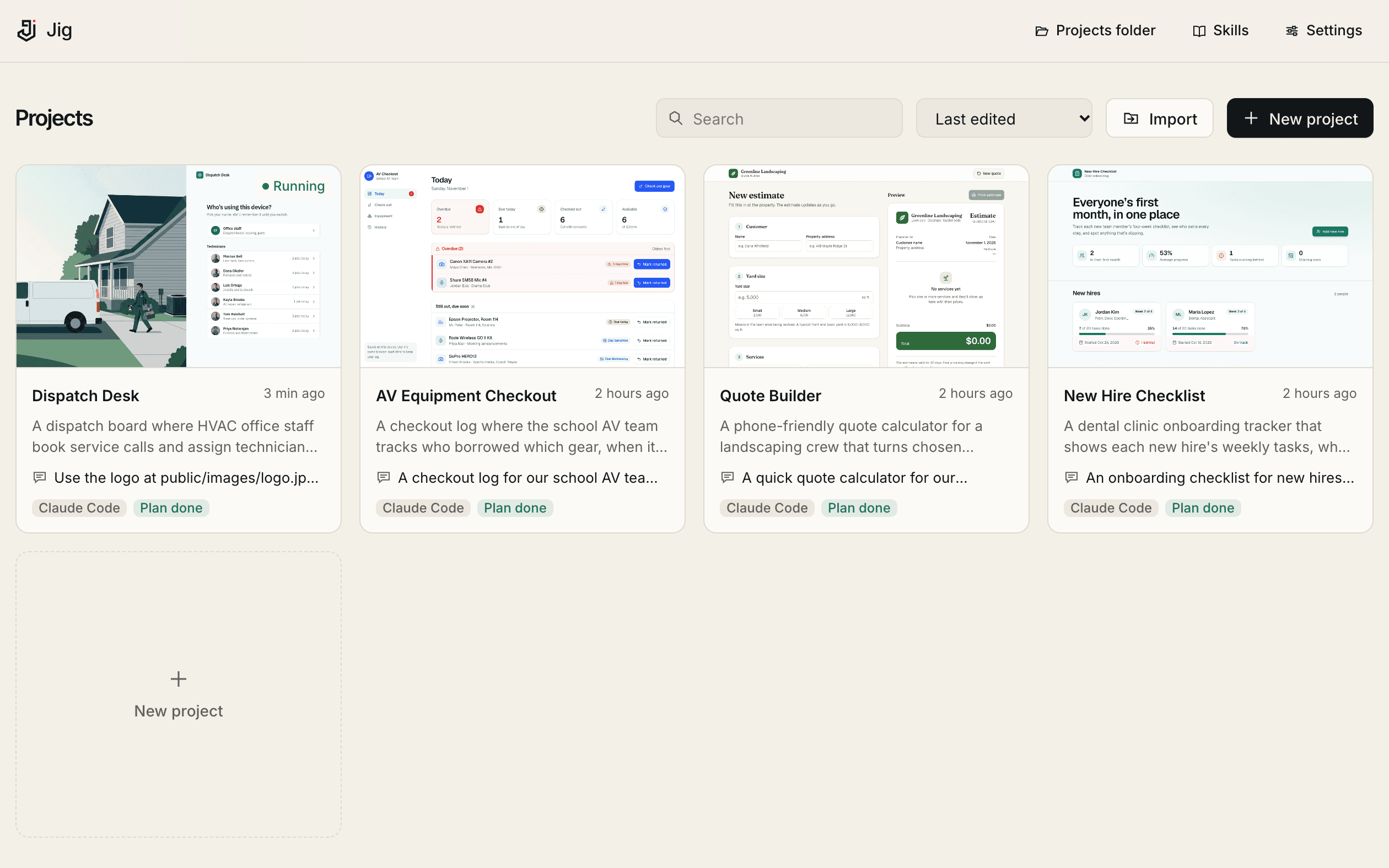
The Jig projects screen: every app as a card with its last request and a live preview thumbnail

All your apps, finally in one place

Side projects scattered across folders, chats and hosted tools become cards on one screen, each with its last request, its plan and a running preview.

Brings in what you have
Point it at your Desktop and Documents. Jig gathers existing projects, links or moves them in, and writes a summary of each.
Picks up where you left off
Project memory keeps a running summary, the decisions made and what is left to do, so the AI never starts from zero.

Built so you never lose work, or a key

Keys stay safe

  • The AI asks for keys through a secure box in the chat, and only ever sees their names
  • Keys are stored in your operating system’s keychain and reused across projects
  • Keys pasted into the chat are caught and saved locally, and redacted from everything Jig shows

Never lose a project

  • Every change is a git checkpoint: keep it, undo it, or go back to any earlier point
  • Rename or move a folder and Jig marks it Moved and helps you find it
  • Stop using Jig and your projects keep working: they are ordinary folders
  • On Pro, every project is backed up to your own Google Drive, OneDrive or Dropbox

See it before you ship it

  • The running app beside the chat, at desktop, tablet and phone sizes
  • Errors become a banner with Ask Jig to fix
  • Bigger changes arrive as a plan you approve first

Publish where you want

  • Your own Netlify account, with the token in your keychain
  • A zip of the built site for any static host
  • A Dockerfile for your own servers
  • Push to GitHub, GitLab, Bitbucket and more

See every step of a buildFree, and what Pro adds

Bring your apps home.

Free for macOS, Windows and Linux. Use the AI plan you already have.

Free for macOS, Windows and Linux.